Google Analytics 4
If, for any reason, you prefer not to grant our account info@searchready.cz access to your GA4 data so we can automatically check and configure everything for you, we have prepared this guide on how to do it manually.
What to expect: You will create 4 custom dimensions, 1 custom metric, 1 audience, and set the maximum data retention. The names and values must match exactly (our reports and audits rely on them).

Where
Note: Create a custom dimension for the search_term parameter exactly as shown in the table. Do not use the native "Search term" (searchTerm) dimension for this – it is only populated by the Enhanced measurement Site search and will not capture search terms from Search Ready. Leave Site search turned off.
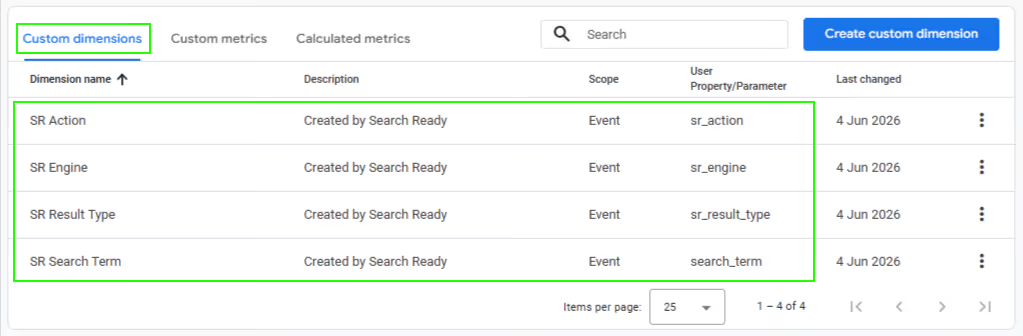
Where

Where
First, in the condition header on the far right, change the Condition scoping setting to "Within the same session".
Build a single condition group containing two events joined by an OR operator:
The result in words: Include users when view_search_results or select_item occurs within the same session, and at the same time, the event has sr_engine = true.
(The "add to cart from Search Ready" action is technically a select_item with the parameter sr_action = add_to_cart, so the second condition covers it automatically).
If the event / parameter does not appear in the autocomplete suggestions: The GA4 UI only suggests events and parameters that have previously been received by the property. If Search Ready has not tracked anything on the website yet, you might not be able to select view_search_results or sr_engine.
Note: The audience only begins populating from the moment it is created – therefore, create it as soon as possible.
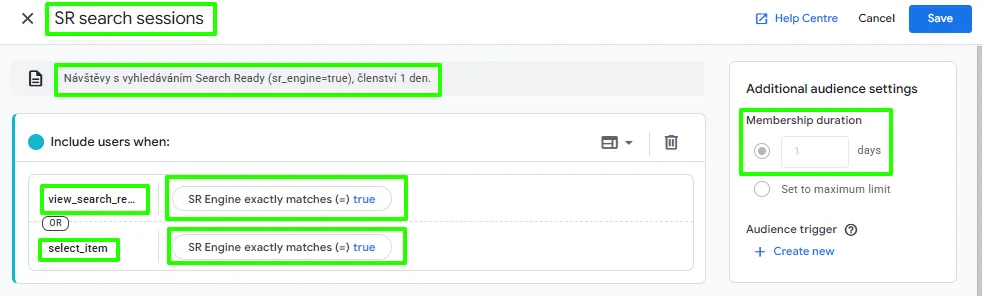
Where
Contact us, and we will get back to you as soon as possible. We will discuss your needs and determine if Search Ready is the right solution for you.

Proud member of MEDIA FACTORY GROUP